
A Beginner's Story: How contentScript.js Talks to background.js in Chrome Extension

If you've ever wondered how Chrome Extensions work behind the scenes, you're not alone! When I started building my first extension, one big question puzzled me: How does contentScript.js communicate with background.js?
🛠️ What Are contentScript.js and background.js?
contentScript.js: This script runs directly in the context of a webpage. It can interact with the DOM (Document Object Model) and access what's happening on the page.
background.js: This script acts as a service worker in Chrome Extensions. It stays alive in the background and manages events, messaging, and state across different parts of the extension.
🤔 Comparison Between contentScript.js and background.js
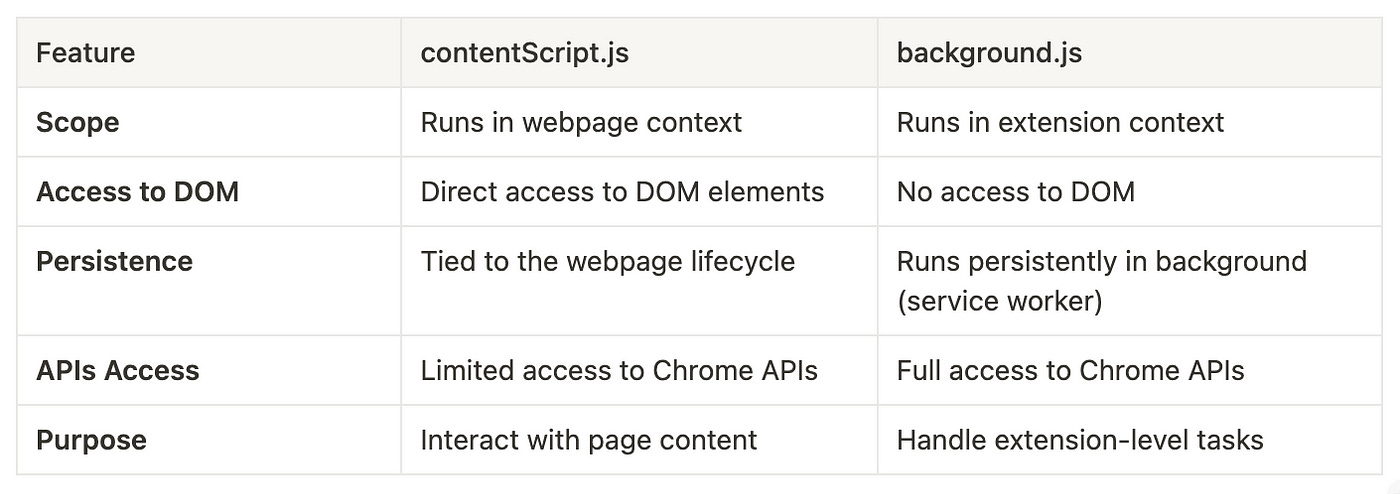
While contentScript.js is like a field agent interacting directly with the webpage, background.js is more like the command center, overseeing the bigger picture and managing behind-the-scenes operations.
So here’s the deal: contentScript.js and background.js don't share the same scope. So, if you want them to talk to each other, you'll need a middleman — and that's where message passing comes in!
📡 How Do They Talk?
Chrome Extensions provide a messaging API that lets these two scripts communicate. Here's a basic example:
🚀 Sending a message from contentScript.js to background.js
// contentScript.js
chrome.runtime.sendMessage({ action: "greet", message: "Hello from contentScript!" }, (response) => {
    console.log("Response from background:", response);
});
In this example:
We use
chrome.runtime.sendMessageto send a message to the background script.We include an object (
actionandmessage) to tell background.js what we want.
📬 Receiving the message in background.js
// background.js
chrome.runtime.onMessage.addListener((request, sender, sendResponse) => {
    if (request.action === "greet") {
        console.log("Message from content script:", request.message);
        sendResponse({ reply: "Hello from background script!" });
    }
});
In this example:
onMessagelistens for incoming messages.We check the
actionfield to determine what to do.We use
sendResponseto reply back to the contentScript.js.
🔄 Two-Way Communication
Notice how we used sendResponse to send a reply? This creates a simple two-way communication channel:
contentScript.js sends a message.
background.js listens and responds.
contentScript.js handles the response.
It's like having a walkie-talkie between two scripts!
🧠 Why Is This Useful?
Imagine you want to fetch some data from an API, but content scripts can't directly access certain APIs (like chrome.storage). Background scripts, however, can! So the flow could be:
contentScript.js asks
background.jsto fetch data.background.js does the heavy lifting.
background.js sends the data back to
contentScript.js.
🎯 Wrapping Up
Understanding how contentScript.js and background.js communicate is key to building powerful Chrome Extensions. Once you get the hang of message passing, you’ll unlock so many possibilities!
But remember, building Chrome Extensions is not just about connecting scripts — it’s about creating a smooth and seamless experience for users. Every message sent and received builds a bridge between different layers of your extension, and every bridge strengthens the functionality of your tool.
As they say, “Good communication builds strong relationships,” and this holds true even in the world of scripts! So keep experimenting, keep building, and before you know it, you’ll have a Chrome Extension that’s ready to take on the world.
Thank you for reading 🙏